
On this page
Section titled “On this page”- Implementation differences: ESP-IDF vs Arduino
- 1. Terminal WebSocket —
/ws, subprotocolwebui-v3 - 2. Data WebSocket —
/wsdata, subprotocolesp3d-v1 - Frame types
- Capability probe
- Transfer flow summary
- Server implementation guide
- Testing
- Reference implementation
There are two separate WebSocket endpoints. They use different URI paths and subprotocols; a client must use the correct pair. Negotiating the wrong subprotocol or path means the connection is handled by the wrong service — file transfer will not work.
| Endpoint | Typical URI (ESP-IDF) | Subprotocol (Sec-WebSocket-Protocol) | Role |
|---|---|---|---|
| Terminal / WebUI | /ws | webui-v3 | BINARY = raw machine/serial bytes (no V1 header). TEXT = PING, NOTIFICATION:, currentID:, etc. |
| Data (external tools) | /wsdata | esp3d-v1 | ESP commands + G-code in TEXT; BINARY = V1 status and file upload/download (SR, SU, …). |
Common mistake: sending V1 binary opcodes on /ws. The server treats binary as stream data, not file-transfer frames — transfers are impossible on that socket by design.
Implementation differences: ESP-IDF vs Arduino
Section titled “Implementation differences: ESP-IDF vs Arduino”Depending on the underlying HTTP server framework, the deployment of these two endpoints differs:
- ESP-IDF (
httpd_ws): Both/wsand/wsdataoperate on the same HTTP port (port 80). The server routes connections to the correct handler strictly based on the requested URI path. - Arduino (
WebSocketsServer): The server cannot natively multiplex WebSockets on the main HTTP port 80. Instead, ESP3D creates two separate TCP listeners on different ports. Typically, the Terminal WebSocket usesHTTP_PORT + 1(e.g., 81), and the Data WebSocket uses the port configured in settings (ESP_WEBSOCKET_PORT, typically 82). The URI path (/wsvs/wsdata) is ignored; the client must connect to the correct port directly.
1. Terminal WebSocket — /ws, subprotocol webui-v3
Section titled “1. Terminal WebSocket — /ws, subprotocol webui-v3”Text mode
Section titled “Text mode”Reserved messages between WebUI and ESP.
Format: <label>:<message>
ESP → WebUI:
-
currentID:<id>
Sent when client connects. It is the last used ID and becomes the active ID. -
activeID:<id>
Broadcast when a new client connects. Clients without this ID should close.
The ESP WS server closes all open WS connections except this one. -
PING:<time left>:<time out>
When authentication is enabled: response to aPING:<sessionId>from the client, informing the time remaining before inactivity timeout. -
PONG:<server_millis>
When authentication is disabled (or client sends barePINGwithout sessionId): firmware answers with a monotonic millisecond value. Used as keepalive reply. -
ERROR:<code>:<message>
Raised during upload when the HTTP answer cannot cancel it.
This is a workaround: there is no API in the current webserver to cancel an active upload. -
NOTIFICATION:<message>
Forwards the message sent by[ESP600]to the WebUI toast system. -
SENSOR: <value>[<unit>] <value2>[<unit2>] …
Sensor data (e.g. DHT22 temperature/humidity).
WebUI → ESP:
-
PING:<sessionId>
When authentication is enabled: keepalive ping sending the current session cookie ID. -
PING:0
Optional keepalive without authentication; ESP answersPONG:<server_millis>.
Keepalive / heartbeat
Section titled “Keepalive / heartbeat”- Clients should read TEXT frames from the server (
PONG:…,currentID, stream lines, etc.). - On ESP-IDF 5.4.x, WebSocket
DATAhandlers may seereq->content_len == 0while a TEXT frame is still pending; the firmware must usehttpd_ws_recv_frame()to read it, otherwise clientPINGis never handled and heartbeats fail.
Binary mode — machine stream (not V1)
Section titled “Binary mode — machine stream (not V1)”ESP → client: payloads are raw bytes from the CNC/serial stream forwarded to the WebUI. There is no application header — not the 4-byte opcode + u16 length layout used on /wsdata.
How the embedded WebUI decodes binary (embedded/src/index.js): each byte is mapped with String.fromCharCode(byte) (ISO-8859-1 style). Buffered until \n (0x0A) or \r (0x0D), then flushed as a line to the console.
Client → ESP: inbound binary on /ws is not interpreted (stub). User commands and G-code are sent as TEXT frames with \n/\r line discipline.
2. Data WebSocket — /wsdata, subprotocol esp3d-v1
Section titled “2. Data WebSocket — /wsdata, subprotocol esp3d-v1”This endpoint carries the ESP3D WebSocket Protocol V1: binary file-transfer and status frames, plus a text channel for ESP commands.
| In scope | Out of scope |
|---|---|
| Binary frames: status, upload, download, abort | Terminal WebSocket (webui-v3) |
| Text channel on the same socket (ESP commands, listings) | HTTP upload / WebDAV |
| Ordering, timeouts, capability probe | WebSocket session / cookie auth (future) |
Authentication
Section titled “Authentication”V1 is specified for the no-WebSocket-auth case: after connect, the client reads the welcome TEXT frame, then may send binary SR or text commands without tokens.
Builds with ESP3D_AUTHENTICATION_FEATURE may expose /wsdata without the same checks as HTTP until a future revision documents the handshake. Simplest interop: open socket → welcome → SR / SU / … with no extra steps.
Protocol version
Section titled “Protocol version”V1 is identified explicitly when the server answers SR while idle: see Capability probe below. Future revisions may increment the version byte or add opcodes; clients must ignore unknown opcodes if they only need a subset.
Two client checks
Section titled “Two client checks”| Step | What it validates | Failure means |
|---|---|---|
| (1) WebSocket handshake | TCP + HTTP upgrade to /wsdata with esp3d-v1 negotiated | Wrong host/port, 404, subprotocol rejected — no data channel |
| (2) Status command SR → RS | After socket open, send binary SR and receive RS within timeout | Endpoint open but no V1 binary handler — do not infer V1 from handshake alone |
On connect
Section titled “On connect”The server sends one TEXT frame first: a welcome line (Welcome to ESP3D-X V…). Clients must read it before assuming the next message is a command reply.
Text mode
Section titled “Text mode”Used for ESP commands and G-code relay (e.g. [ESP720] list flash, [ESP740] list SD). Use json=yes for directory listings — one JSON object, faster and unambiguous. Plain-text listings end with Total:… / Available:… lines without a final ok.
Line termination: client TEXT is accumulated until \n or \r. A frame without a line ending is received but does not run the command. Tools should send [ESP720]…\n.
Flash paths: [ESP720] takes paths relative to the flash logical root; use / for root.
Binary mode — V1 frame format
Section titled “Binary mode — V1 frame format”Packet data size defaults to 1024 bytes (ESP3D_WS_TRANSFER_PACKET_SIZE).
All frames share the same header:
| Byte 0 | Byte 1 | Byte 2–3 | Byte 4+ |
|---|---|---|---|
| Opcode MSB | Opcode LSB | Payload length (uint16_t LE) | Payload |
- Opcode: 2 ASCII bytes identifying the frame type (e.g.
SR,UP). - Payload length: number of bytes that follow the header, little-endian uint16_t.
- All multi-byte integer fields in the payload are little-endian.
Start / ACK status byte (first byte of US, DS, PU, UE where applicable):
| Byte | Hex | Meaning |
|---|---|---|
O | 0x4F | ok / idle |
E | 0x45 | error |
B | 0x42 | busy |
A | 0x41 | abort |
Frame types
Section titled “Frame types”Query status — SR / RS
Section titled “Query status — SR / RS”Client → ESP (no payload):
S | R | 0x00 | 0x00 |
ESP → Client:
Response to SR. First payload byte = transfer state:
| Byte | Hex | Meaning |
|---|---|---|
O | 0x4F | idle / ok |
B | 0x42 | busy |
E | 0x45 | error |
A | 0x41 | abort |
D | 0x44 | download ongoing |
U | 0x55 | upload ongoing |
Idle (V1): payload = O (0x4F) + 1 (0x01) — protocol version byte.
| R | S | 0x02 | 0x00 | O | 1 |
Note: legacy servers may send only O (1-byte payload, no version).
Error:
After the status byte: 1 byte error code, 1 byte string length, then the string.
R | S | PL_LO | PL_HI | E | ERR_CODE | STR_LEN | STR… |
Upload in progress:
After the status byte: path size (1 byte), path, filename size (1 byte), filename,
total file size (uint32_t LE), processed bytes (uint32_t LE), last packet ID (uint32_t LE).
R | S | PL_LO | PL_HI | U | PATH_SZ | PATH… | NAME_SZ | NAME… | TOTAL(4) | DONE(4) | LAST_ID(4) |
Download in progress:
Same layout as Upload ongoing, with D status byte.
R | S | PL_LO | PL_HI | D | PATH_SZ | PATH… | NAME_SZ | NAME… | TOTAL(4) | DONE(4) | LAST_ID(4) |
Start upload — SU / US
Section titled “Start upload — SU / US”Client → ESP:
Payload: path size (1 byte), path, filename size (1 byte), filename, total file size (uint32_t LE).
S | U | PL_LO | PL_HI | PATH_SZ | PATH… | NAME_SZ | NAME… | FILE_SIZE(4) |
ESP → Client (OK — transfer can start):
U | S | 0x01 | 0x00 | O |
ESP → Client (Error — transfer rejected):
U | S | 0x01 | 0x00 | E |
Upload packet — UP / PU
Section titled “Upload packet — UP / PU”Client → ESP:
Payload: packet ID (uint32_t LE), then data bytes.
U | P | PL_LO | PL_HI | ID(4) | DATA… |
ESP → Client (ACK):
Success (5 bytes): O + packet_id (uint32_t LE).
P | U | 0x05 | 0x00 | O | ID(4) |
Error (5 bytes): E + packet_id (uint32_t LE). If UP payload was too short to contain an id, id = 0xFFFFFFFF.
| P | U | 0x05 | 0x00 | E | ID(4) |
Note: clients may treat PU with length 1 and E only as a legacy pre-correlation response.
End upload — EU / UE
Section titled “End upload — EU / UE”Sent by the client after the last upload packet.
Client → ESP (no payload):
E | U | 0x00 | 0x00 |
ESP → Client (OK):
U | E | 0x01 | 0x00 | O |
ESP → Client (Error):
U | E | 0x01 | 0x00 | E |
Start download — SD / DS
Section titled “Start download — SD / DS”Client → ESP:
Payload: path size (1 byte), path, filename size (1 byte), filename.
S | D | PL_LO | PL_HI | PATH_SZ | PATH… | NAME_SZ | NAME… |
ESP → Client (OK — transfer can start):
Payload: status O, then total file size (uint32_t LE).
D | S | 0x05 | 0x00 | O | FILE_SIZE(4) |
ESP → Client (Error):
D | S | 0x01 | 0x00 | E |
Download packet — DP / PD
Section titled “Download packet — DP / PD”ESP → Client:
Payload: packet ID (uint32_t LE), then data bytes.
D | P | PL_LO | PL_HI | ID(4) | DATA… |
Client → ESP (ACK):
P | D | 0x05 | 0x00 | O | ID(4) |
End download — ED / DE
Section titled “End download — ED / DE”Sent by the ESP after the last download packet.
ESP → Client (no payload):
E | D | 0x00 | 0x00 |
Client → ESP (ACK):
D | E | 0x01 | 0x00 | O |
Command — CM
Section titled “Command — CM”Client → ESP (1-byte payload: command code):
C | M | 0x01 | 0x00 | CMD |
Command codes:
| Code | Hex | Meaning |
|---|---|---|
A | 0x41 | Abort current transfer |
Abort frame:
C | M | 0x01 | 0x00 | A |
Capability probe
Section titled “Capability probe”Clients must assume no binary file-transfer support until check (2) succeeds, even if (1) succeeded.
- After WebSocket is open, consume the mandatory welcome TEXT frame.
- Send binary SR with empty payload (header only:
S,R, length0LE). - Wait for a binary response (recommended timeout: 2–5 s).
- Interpretation:
- No binary RS before timeout → no binary support (wrong endpoint/subprotocol or old firmware).
- Binary RS with non-empty payload → binary status channel present; first payload byte = transfer state.
- Idle (
O), payload ≥ 2 bytes: byte 1 = protocol version; value1= V1 as defined here. - Idle (
O), payload 1 byte: legacy server — clients may still attempt V1 but explicit version byte is preferred.
Transfer flow summary
Section titled “Transfer flow summary”Upload
Section titled “Upload”Download
Section titled “Download”Abort (at any point during transfer)
Section titled “Abort (at any point during transfer)”Server implementation guide
Section titled “Server implementation guide”Connection:
- Path:
/wsdata(distinct from/ws). - Subprotocol: negotiate
esp3d-v1. Reject clients offering onlywebui-v3for this URI. - Send one TEXT welcome frame immediately after accept.
Minimum V1 behavior:
- SR → RS — idle:
O+ version1(2-byte payload). Upload/download in progress: state byte + path + filename + sizes. - Upload sequence — accept SU, UP, EU; reply US, PU (5-byte payload), UE.
- Download sequence — accept SD; reply DS with file size, then DP / ED; client sends PD / DE.
- Concurrency — one active transfer per connection; return
Bon US/DS if busy. - Text channel — same socket carries TEXT frames for
[ESP720]/[ESP740]and G-code.
Error handling:
- Invalid opcode: log/drop; optional TEXT error is product-specific.
- Payload too short: respond with
Eon the relevant ACK if the protocol defines one for that step.
Testing
Section titled “Testing”python tools/websocket/ws_transfer_test.py --host <ip> --port <port> statuspython tools/websocket/ws_transfer_test.py --host <ip> --port <port> roundtrip <file> /fsTesting tools are located in the tools/websocket directory of the ESP3D repository.
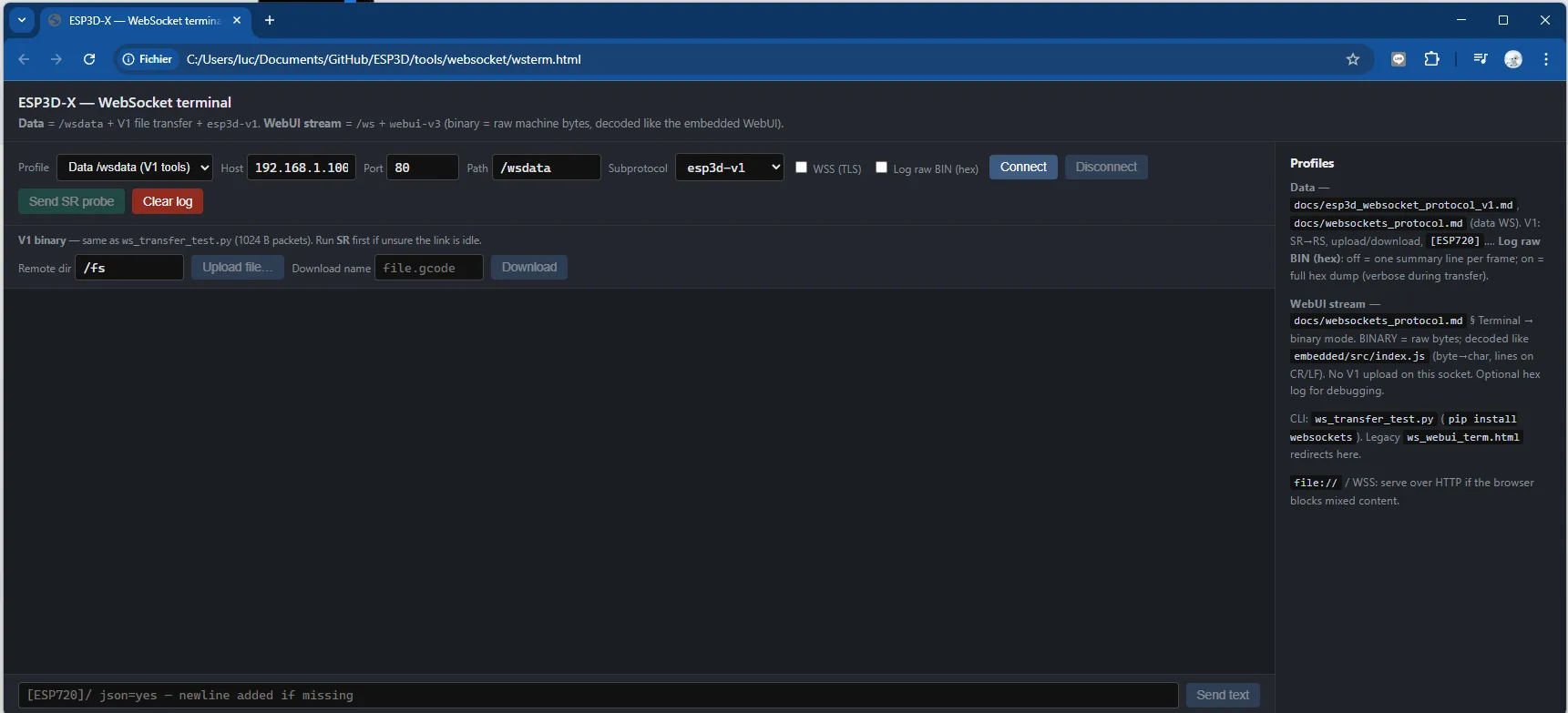
wsterm.html , websocket client test
Reference implementation
Section titled “Reference implementation”- Server:
main/modules/websocket_server/esp3d_ws_data_service.cpp/.h - Constants:
WS_OP_*,WS_STATUS_*,WS_BINARY_PROTOCOL_V1 - Packet size:
ESP3D_WS_TRANSFER_PACKET_SIZE
Client note
Section titled “Client note”The pendant’s WebSocket client build targets text streaming to the CNC; it does not implement the V1 binary file-transfer client. Third-party servers on the machine tool can implement this document so PC or phone clients perform file transfer over ws://.