
You can update ESP3D-TFT using the maintenance page, the web ui and the SD Card and OTA process.
Maintenance page
Section titled “Maintenance page”You can update/manage flash file system content and update firmware.
This page is automaticaly available if no index.html / index.html.gz is present on flash filesystem.
Another way to access it, is to add the parameter ?forcefallback=yes to your IP address in browser.
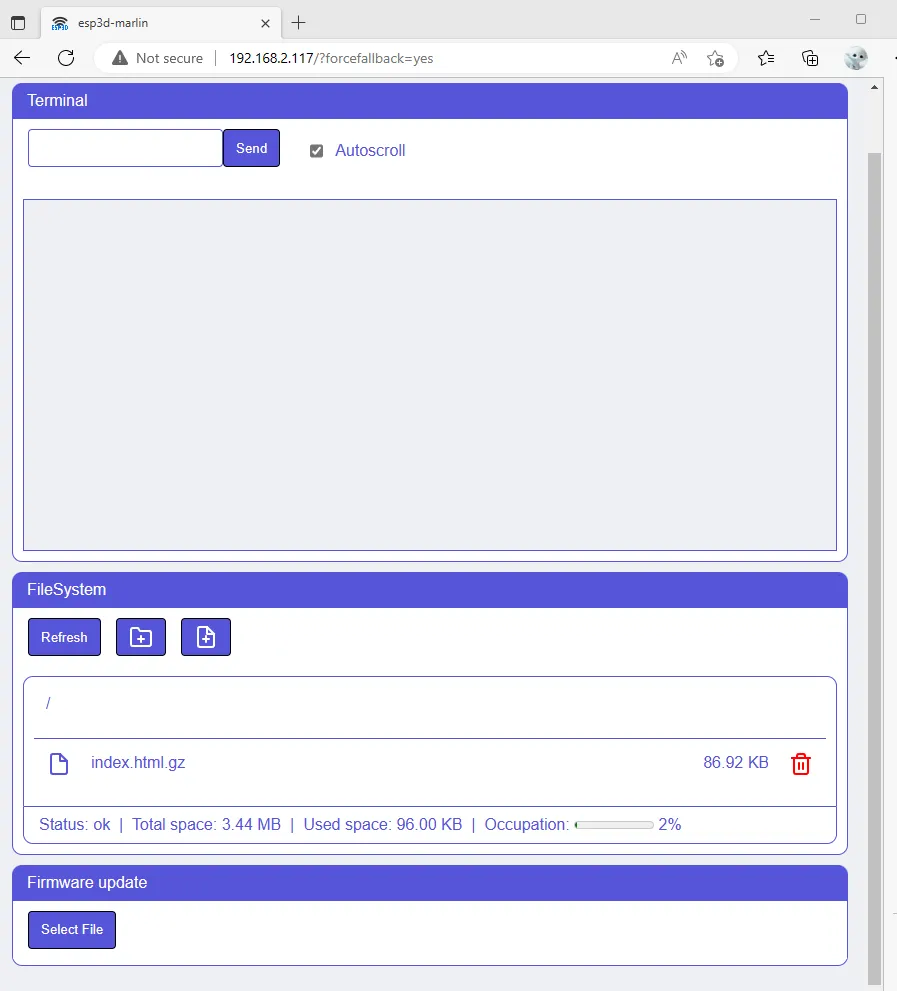
Web UI
Section titled “Web UI”You need to have webupdate feature enabled.
You can update/manage flash file system content and update firmware.

SD Card
Section titled “SD Card”You need to have sd card enabled and sd update feature enabled in configuration.h.
Settings
Section titled “Settings”You can update all esp3d settings when board is starting using an ini file named esp3dcnf.ini at root of SD card.
```ini[network]#Hostname string of 32 chars maxhostname = myesp
#Radio mode BT, STA, AP, SETUP, OFFradio_mode = STA
#Station fallback mode BT, SETUP, OFFsta_fallback  = SETUP#Active when boot device or not  Yes / NoRadio_enabled = Yes
#STA SSID string of 32 chars maxSTA_SSID = myssid
#STA Password string of 64 chars max, minimum  0 or 8 charsSTA_Password = *******
#STA IP Mode DHCP / STATICSTA_IP_mode = DHCP
#STA static IPSTA_IP = 192.168.0.2
#STA static gatewaySTA_GW = 192.168.0.1
#STA static maskSTA_MSK = 255.255.255.0
#STA static dnsSTA_DNS = 192.168.0.1
#AP SSID string of 32 chars maxAP_SSID = myssid
#AP Password string of 64 chars max, minimum  0 or 8 charsAP_Password = 12345678
#AP static IPAP_IP = 192.168.0.1
#AP channel 1~14AP_channel = 11
[services]#Active or not HTTP Yes / NoHTTP_active = Yes
#HTTP PortHTTP_Port = 80
#Active or not Telnet Yes / NoTELNET_active = Yes
#Telnet PortTELNET_Port = 23
#Active or not WebSocket Yes / NoWebSocket_active = Yes
#WebSocket PortWebSocket_Port = 8282
#Active or not WebDav Yes / NoWebDav_active = Yes
#WebSocket PortWebDav_Port = 8282
#Active or not FTP Yes / NoFTP_active = Yes
#FTP control PortFTP_Control_Port = 21
#FTP active PortFTP_Active_Port = 20
#FTP passive PortFTP_Passive_Port = 55600
#Auto notificationAUTONOTIFICATION = Yes
#Notification type None / PushOver / Email / Telegram /IFTTTNOTIF_TYPE = None
#Notification token 1 string of 64 chars maxNOTIF_TOKEN1 =
#Notification token 2 string of 64 chars maxNOTIF_TOKEN2 =
#Notification settings string of 127 chars maxNOTIF_TOKEN_Settings=
#SD card Speed factor 1 2 4 6 8 16 32SD_SPEED = 4
#Check update from SD Yes / NoCHECK_FOR_UPDATE = Yes
#Enable Buzzer Yes / NoActive_buzzer = yes
#Active Internet time Yes / NoActive_Internet_time = yes
#Time servers string of 127 chars maxTime_server1 = 1.pool.ntp.orgTime_server2 = 2.pool.ntp.orgTime_server3 = 3.pool.ntp.org
#time zone +/-HH:mmTime_zone = +08:00
#Authentication passwords string of 20 chars maxADMIN_PASSWORD = xxxxxxxUSER_PASSWORD = xxxxxxx#session time out in minSesion_timeout = 3
[system]#Target Firmware: Marlin / Repetier  / Smoothieware / GRBL / grblHAL / HP_GLTargetFW=Marlin
#Output: SERIAL / USBoutput=SERIAL
#Baud RateBaud_rate = 115200
#Baud RateUSB_Serial_Baud_rate = 115200
Once update is done all passwords set in file will be replaced by `********`.
#### FirmwareYou can update esp3d firmware when board is starting using a binary image file of firmware `esp3dfw.bin` at root of SD card.If update is sucessful the file will be renamed to `esp3dfw.ok`, if `esp3dfw.ok` already exists, it will be first renamed using some index.If update fail the file is renamed to `esp3dfw.bad` to avoid to try to update at each boot.
#### Flash filesystemYou can update esp3d flash filesystem when board is starting using a binary image file of filesystem `esp3dfs.bin` at root of SD card.If update is sucessful the file will be renamed to `esp3dfs.ok`, if `esp3dfs.ok` already exists, it will be first renamed using some index.If update fail the file is renamed to `esp3dfs.bad` to avoid to try to update at each boot.