
Download the project
Section titled “Download the project”Using git
Section titled “Using git”- Clone repository
git clone https://github.com/luc-github/ESP3D-TFT.git ESP3D-TFT - Go to the project
cd ESP3D-TFT - Update the project submodules
git submodule update --init --recursive
Using release package
Section titled “Using release package”Not ready yet, please be patient
Setup your development environment
Section titled “Setup your development environment” Visual Studio Code
Download and install VSCode
Install the espressif vscode extension
Section titled “Install the espressif vscode extension”The espressif extension can be installed using the extension manager.
 Espressif Extension
Please follow the official tutorial
You can also install ESP-IDF offline .Especially suitable for people with slow download speeds.
- Download installer.
- Installing the installer.
Install the CMake extension and CMake Tools extension in vscode
Section titled “Install the CMake extension and CMake Tools extension in vscode”Cmake can automatically download the components required for ESP3D, such as camera and USB host.
Configure the extension
Section titled “Configure the extension”- Select : View->Command palette
- Type : configure esp
If you install ESP-IDF offline, you need to select “UseExitSetup”
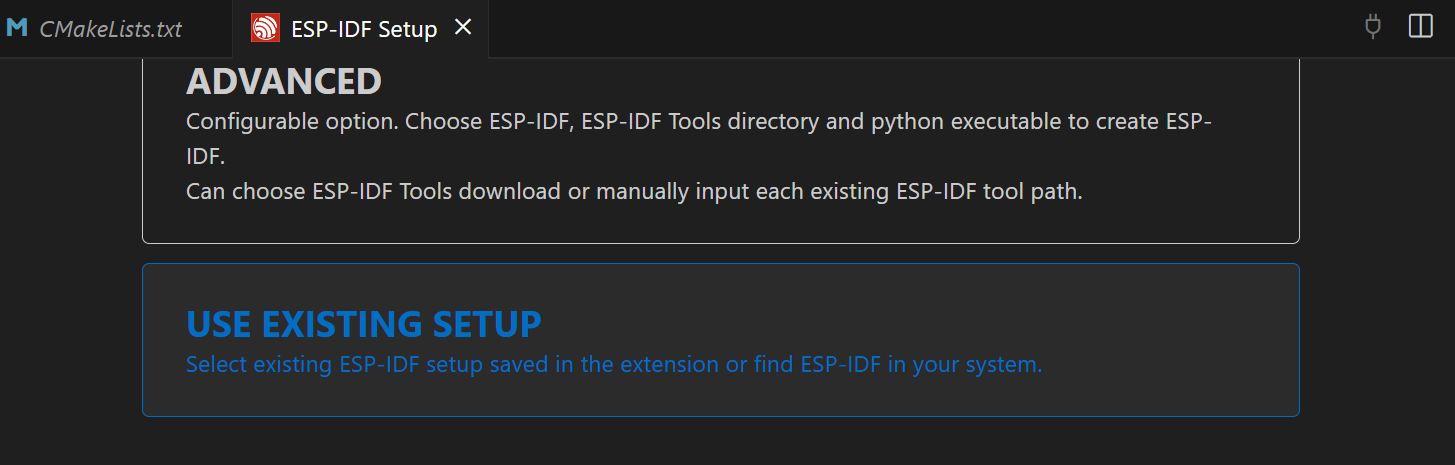
Then select the ESP IDF installation path
Open ESP3D-TFT project
Section titled “Open ESP3D-TFT project”- Go to file and select open folder where project is located
Configure the CMakeLists.txt
Section titled “Configure the CMakeLists.txt”Select the target according the hardware
```txt# ######################################## Select the targeted hardware# #######################################
# With TFT:OPTION(ESP32S3_HMI43V3 "TFT TARGET is ESP32S3 HMI 4.3inches" OFF)OPTION(ESP32_ROTRICS_DEXARM35 "TFT TARGET is ESP32 Rotrics DexArm 3.5inches" OFF)OPTION(ESP32S3_ZX3D50CE02S_USRC_4832 "TFT TARGET is ESP32S3 Panlee ZX3D50CE02S-SRC-4832 3.5inches" ON)OPTION(ESP32S3_BZM_TFT35_GT911 "TFT TARGET is ESP32S3 Panlee BZM 3.5inches" OFF)OPTION(ESP32S3_8048S070C "TFT TARGET is ESP32S3_8048S070C - 7.0in. 800x480 (Capacitive)" OFF)OPTION(ESP32S3_8048S050C "TFT TARGET is ESP32S3_8048S050C - 5.0in. 800x480 (Capacitive)" OFF)OPTION(ESP32S3_8048S043C "TFT TARGET is ESP32S3_8048S043C - 4.3in. 800x480 (Capacitive)" OFF)OPTION(ESP32S3_4827S043C "TFT TARGET is ESP32S3_4827S043C - 4.3in. 480x272 (Capacitive)" OFF)OPTION(ESP32_3248S035C "TFT TARGET is ESP32_3248S035C - 3.5in. 480x320 (Capacitive)" OFF)OPTION(ESP32_3248S035R "TFT TARGET is ESP32_3248S035R - 3.5in. 480x320 (Resistive)" OFF)OPTION(ESP32_2432S028R "TFT TARGET is ESP32_2432S028R - 2.8in. 320x240 (Resistive)" OFF)
# Without TFT:OPTION(ESP32S3_FREENOVE_1_1 "HARDWARE TARGET is ESP32S3 Freenove v1.1" OFF)OPTION(ESP32S3_CUSTOM "HARDWARE TARGET is ESP32S3 custom board" OFF)OPTION(ESP32_CUSTOM "HARDWARE TARGET is ESP32 custom board" OFF)
# ######################################## Optionally: Select hardware mods applied# ########################################only for ESP32S3_8048S070C OR ESP32S3_8048S050C OR ESP32S3_8048S043C OR ESP32S3_4827S043C OR ESP32_3248S035COPTION(HARDWARE_MOD_GT911_INT "Hardware Mod: GT911 INT pin" OFF)
#Only for ESP32_3248S035C OR ESP32_3248S035R OR ESP32_2432S028R# 4MB Flash, no PSRAM by defaultOPTION(HARDWARE_MOD_8MB_FLASH "Hardware Mod: 8MB Flash Upgrade" OFF)OPTION(HARDWARE_MOD_16MB_FLASH "Hardware Mod: 16MB Flash Upgrade" OFF)OPTION(HARDWARE_MOD_EXT_PSRAM "Hardware Mod: External PSRAM" OFF)
# ######################################## Select the targeted firmware# #######################################OPTION(TARGET_FW_MARLIN "Marlin firmware" ON)OPTION(TARGET_FW_REPETIER "Repetier firmware" OFF)OPTION(TARGET_FW_SMOOTHIEWARE "Smoothieware firmware" OFF)OPTION(TARGET_FW_GRBL "GRBL firmware" OFF)
# ######################################## Select the Features# #######################################OPTION(ESP3D_AUTHENTICATION "Authentication on all clients" OFF)OPTION(DISABLE_SERIAL_AUTHENTICATION "Disable Serial Authentication" ON)OPTION(TIME_SERVICE  "Time service" ON)OPTION(SSDP_SERVICE "SSDP service" ON)OPTION(MDNS_SERVICE "MDNS service" ON)OPTION(WIFI_SERVICE "WiFi service" ON)OPTION(BT_SERVICE "Bluetooth service" ON)OPTION(WEB_SERVICES "Web Services http/websocket/webdav" ON)OPTION(WEBDAV_SERVICES "WebDav Services" ON)OPTION(TELNET_SERVICE "Telnet service" ON)OPTION(WS_SERVICE "WebSocket data service" ON)OPTION(TFT_UI_SERVICE "TFT UI service" ON)OPTION(SD_CARD_SERVICE "SD card service" ON)OPTION(NOTIFICATIONS_SERVICE "Notifications service" ON)OPTION(UPDATE_SERVICE "Update service" ON)OPTION(USE_FAT_INSTEAD_OF_LITTLEFS "Use FAT instead of LittleFS" OFF)
# ######################################## Do not change anything below this line# #######################################cmake_minimum_required(VERSION 3.12.4)set(CMAKE_CXX_STANDARD 20)
include (cmake/targets.cmake)
include($ENV\{IDF_PATH\}/tools/cmake/project.cmake)
include (cmake/features.cmake)
project(ESP3D-TFT    VERSION 1.0    DESCRIPTION "ESP3D TFT")
### Clean / Compile / Flash- Select : View->Command palette - Type : ESP-IDF: (Clean / Build / Flash..)
or
- Just use the bottom menu for all commands

<aside class="info-panel"> <strong>Note:</strong>
Sometime the build button failed and you must delete the build directory manualy
</aside>If compilation failed because of missing components like ssdp or LittleFS, it means you did not executed the `git submodule update --init --recursive`
If compilation failed because of not declared config element like `CONFIG_FATFS_MAX_LFN`, it means your sdkconfig is corrupted, it happen when you change target esp, you may see a ne file with `.old` at the end, it is a bug in extension, just revert all change done in repository.
You can check using the command `git status -s` to see if you have any change in repository
If you use github desktop application, just revert all changes in repository, if you used git, you can revert all changes with `git reset --hard HEAD`You need to update the CMakeLists.txt to match your hardware the revert command removed your latest changes.
### Connect the TFT
<aside class="info-panel"> <strong>Note:</strong>
If you use serial connection, to ensure the esp board and the connected board can communicate, be sure both boards use the same baud rate.</aside>