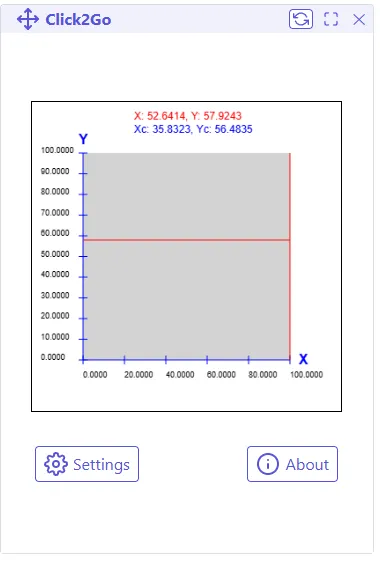
This ESP3D-WebUI extension allows you to visualize and interact with a represention of the workspace of your machine. It offers the following features:
- Display the workspace with X and Y axes, along with customizable graduations.
- Support for mouse and touch interactions, providing intuitive control.
- Real-time display of the machine coordinates of the cursor or touch point.
- Customizable UI styles using CSS variables.
- Customisable travel command to send to the machine.
- Customizable precision of the coordinates.
Where to find the extension?
Section titled “Where to find the extension?”The extension is available on the ESP3D github.
The ready to use package is available in dist directory here
How to install the extension?
Section titled “How to install the extension?”Just follow instructions of standard extension installation from here
Configuration
Section titled “Configuration”Go to settings
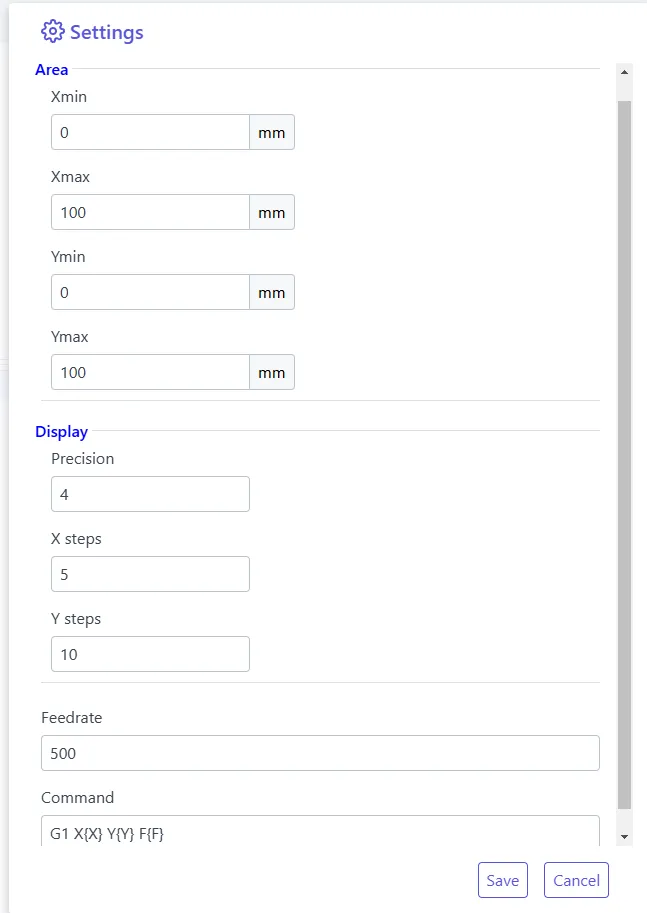
Set the following parameters:
- define the size of the workspace
- define the precision of the coordinates
- define the steps you want to display on the workspace
- define the speed of the travel command
- define the travel command to send to the machine
How to use the extension?
Section titled “How to use the extension?”Main UI:
The red coordinates are the cursor position
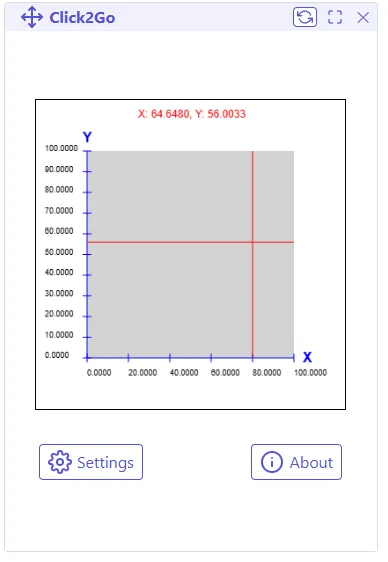
Click on the workspace to move the machine to the clicked position, that is all !
The blue coordinates are latest clicked position.