
This ESP3D-WebUI extension is a WebGL-based G-code viewer designed to provide an interactive and high-performance visualization of G-code files directly in the web browser.
It offers the following features:
- Real-time 3D rendering of 3D printing toolpaths.
- Efficient loading and processing of large G-code files.
- Intuitive user interface with visualization controls.
- Dynamic filtering of print layers.
- Customizable viewing options (auto-rotation, axis inversion, etc.).
- Performance optimizations for smooth experience even with complex models.
Where to find the extension?
Section titled “Where to find the extension?”The extension is available on the ESP3D github.
The ready to use package is available in dist directory here
How to install the extension?
Section titled “How to install the extension?”Just follow instructions of standard extension installation from here
Configuration
Section titled “Configuration”Go to settings using the menu:
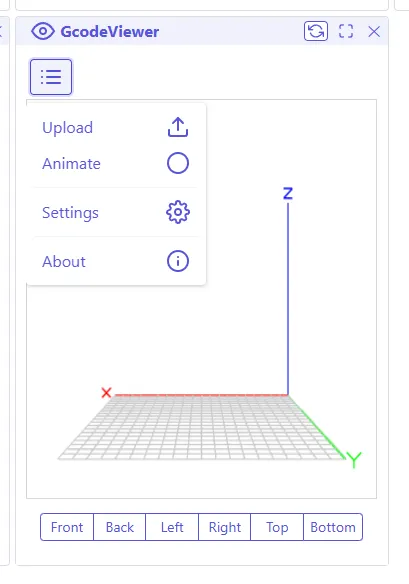
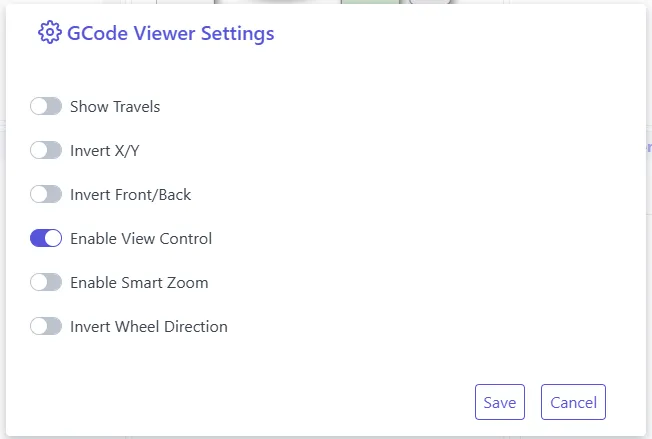
You define the following preferences:
- Show/Hide the travel paths
- Invert X/Y axis
- Invert front/back view
- Enable/Disable the control of the view
- Enable/Disable the smart camera’s zoom
- Invert the mouse’s wheel direction
How to use the extension?
Section titled “How to use the extension?”Main UI:
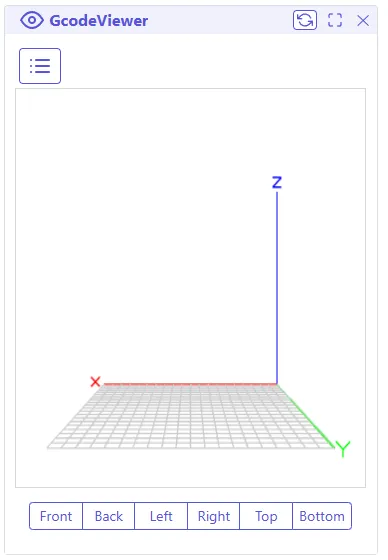
You need to load the gcode file using the menu

You can move the camera position using the mouse or touch screen, you can switch between the different views using the view bar on the bottom. You can also define the starting layer and the ending layer using the layer bar on the bottom.